
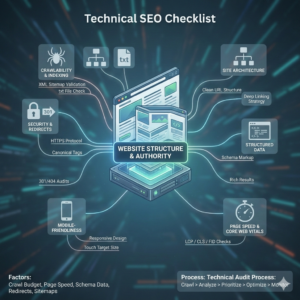
Technical SEO is the foundation of organic growth. If search engines cannot crawl, render, and index your website properly, even the best content will struggle to rank.
This guide walks you through a prioritized technical SEO checklist for 2026. It focuses on what actually moves rankings, improves visibility in AI-powered search results, and strengthens your site’s overall search performance.
How to Use This Technical SEO Checklist
Not every task has an equal impact. Here’s how to approach this checklist strategically.
Critical Tasks
Issues that directly block crawling, indexing, or severely damage rankings. These should be fixed immediately.
Important Tasks
Enhancements that improve performance, structure, and user experience.
Advanced Tasks
For large sites, competitive industries, or SEO professionals managing complex architectures.
How Often Should You Run a Technical Audit?
- Small websites: Every 3–6 months
- Medium to large websites: Quarterly
- Ecommerce or publishing sites: Monthly
1. Crawlability: Ensure Search Engines Can Access Your Website
If Google cannot crawl your site efficiently, nothing else matters.
Check That Important Pages Return 200 Status Codes
Every key page must return a 200 OK status. Fix:
- 404 errors
- 500 server errors
- Soft 404s
Fix Redirect Chains and Loops
Avoid multiple redirect hops. Use single 301 redirects for permanently moved pages.
Optimize Your Robots.txt File
Ensure:
- Important pages are not blocked
- CSS and JavaScript files are crawlable
- Sitemap location is defined
Validate Your XML Sitemap
Your sitemap should:
- Include only indexable URLs
- Exclude noindex, redirected, or canonicalized pages
- Be submitted in Google Search Console
2. Indexation: Make Sure the Right Pages Get Indexed
Crawling does not guarantee indexing.
Check Indexing Status in Google Search Console
Use the URL Inspection tool to verify:
- Page is indexed
- Google-selected canonical matches your preference
Fix Duplicate Content with Canonical Tags
Use rel=canonical to signal the preferred version of duplicate or similar pages.
Remove Mixed Signals
Avoid combining:
- Noindex + canonical
- Blocked robots + sitemap inclusion
Fix Orphan Pages
Every important page should be accessible via internal links.
3. Site Architecture & Internal Structure
A clean structure improves crawl efficiency and ranking distribution.
Keep Important Pages Within Three Clicks
Shallow architecture improves crawl frequency and link equity flow.
Use Logical URL Structure
Good example:
example.com/services/technical-seo/
Avoid:
- Random parameters
- Long, messy URL strings
Implement Breadcrumb Navigation
Breadcrumbs:
- Improve internal linking
- Clarify page hierarchy
- Enhance structured data opportunities
Optimize Internal Linking
Use descriptive anchor text. Link contextually between related pages.
4. Core Web Vitals Optimization
User experience directly impacts performance signals.
Core Web Vitals now focus on:
- Largest Contentful Paint (LCP)
- Interaction to Next Paint (INP)
- Cumulative Layout Shift (CLS)
You can test these using tools like Google PageSpeed Insights and Google Search Console.
Improve Largest Contentful Paint (LCP)
- Optimize hero images
- Use modern image formats
- Improve server response time
- Use a CDN
Reduce Interaction to Next Paint (INP)
- Minimize heavy JavaScript
- Break long tasks
- Reduce third-party scripts
Fix Cumulative Layout Shift (CLS)
- Set width and height for images
- Avoid dynamic content pushing layout
- Reserve space for ads and embeds
5. Improve Overall Page Speed
Speed impacts rankings, crawl budget, and user retention.
Compress and Optimize Images
Use next-gen formats and proper sizing.
Minify CSS and JavaScript
Remove unused code and reduce file sizes.
Reduce Render-Blocking Resources
Load non-critical scripts asynchronously.
Implement Browser Caching
Set proper cache headers for static resources.
Improve Server Response Time (TTFB)
Upgrade hosting if necessary. Shared hosting often limits performance.
6. Mobile-First Optimization
Google primarily uses the mobile version for indexing.
Use Responsive Design
Avoid separate m-dot sites unless absolutely necessary.
Ensure Content Parity
Mobile should contain:
- Same content
- Same links
- Same structured data
Avoid Intrusive Interstitials
Pop-ups that block content can hurt rankings.
7. JavaScript & Rendering Optimization
Modern websites rely heavily on JavaScript. Rendering issues can block indexing.
Test How Google Renders Your Pages
Use URL Inspection to view rendered HTML.
Use Server-Side Rendering (SSR) If Needed
For heavy JS frameworks, SSR or dynamic rendering improves crawl reliability.
Avoid Lazy Loading Critical Content
Above-the-fold content should load immediately.
Ensure Important Content Is in HTML
Do not rely entirely on client-side rendering.
8. Structured Data & Schema Markup
Structured data helps search engines understand your content better and can trigger rich results.
Test markup using Google Rich Results Test.
Add Organization and Website Schema
Helps establish brand identity.
Use Relevant Schema Types
- Article
- Product
- FAQ
- Breadcrumb
Avoid Spammy Markup
Only mark up content that is visible to users.
9. Security & Trust Signals
Security is a ranking factor and a user trust requirement.
Enforce HTTPS
Redirect all HTTP pages to HTTPS.
Fix Mixed Content Issues
Ensure images, scripts, and styles load securely.
Implement HSTS
Adds an extra security layer.
Monitor for Malware
Regularly check for hacked pages or injected spam.
10. International SEO (If Applicable)
For multilingual or multi-country websites:
Implement Hreflang Correctly
Ensure:
- Proper language-region codes
- Reciprocal tags
- Self-referencing hreflang
Avoid Automatic Redirection
Let users choose their region instead of forcing IP-based redirects.
11. Advanced Technical SEO (For Competitive Sites)
For larger or enterprise-level websites:
Log File Analysis
Understand how search engines actually crawl your site.
Crawl Budget Optimization
Reduce low-value URLs. Improve internal linking to priority pages.
Faceted Navigation Control
Prevent duplicate combinations from being indexed.
Edge SEO & Server-Level Optimization
Implement rules directly at CDN or server level for faster execution.
Technical SEO Audit Checklist Summary
Here’s your quick reference:
Crawlability
- 200 status codes
- No redirect chains
- Optimized robots.txt
- Clean sitemap
Indexation
- No duplicate signals
- Proper canonicalization
- No orphan pages
Structure
- Logical URL hierarchy
- Strong internal linking
- Breadcrumb navigation
Performance
- Pass Core Web Vitals
- Optimized images
- Reduced JavaScript
Mobile
- Responsive design
- Content parity
Schema
- Relevant structured data
- Valid markup
Security
- HTTPS enforced
- No mixed content
Advanced
- Log file review
- Crawl budget management
Technical SEO FAQ
What is technical SEO?
Technical SEO refers to optimizing a website’s infrastructure so search engines can efficiently crawl, render, index, and understand its content.
How often should you perform a technical SEO audit?
At least quarterly. High-traffic or ecommerce websites should audit monthly.
What is the most important technical SEO factor?
Crawlability and indexation. If search engines cannot access your pages properly, rankings will suffer regardless of content quality.
Does technical SEO directly affect rankings?
Yes. While content and backlinks drive authority, technical SEO ensures that search engines can discover, understand, and evaluate that content correctly.